


1. The Strategic Rationale: Why Move to Xero?
Digital transformation is the primary challenge and opportunity for modern South African practices. According to the IFAC SMP Global Survey, staying current with software and moving to the cloud are top priorities for firms worldwide. Xero facilitates this transformation by shifting the accountant’s role from a historian of manual data to a “trusted advisor” who interprets real-time insights.
Key Differentiators Driving Efficiency:
- Advanced Automation: Automated bank feeds and “Cash Coding” allow for the reconciliation of bank statement lines in bulk, drastically reducing manual processing time.
- Accessibility & Oversight: Multi-user access and “Review on the Go” capabilities allow for remote collaboration. Furthermore, Xero HQ provides a practice-wide dashboard, allowing partners to see exactly whose work is behind schedule at a glance.
- Connected Ecosystem: Integration with a 600+ app ecosystem—including tools like AutoEntry or Receipt Bank for automated data capture and Syft Analytics for management reporting—creates a seamless, end-to-end workflow.
The “So What?”: These features enable the “de-skilling” of routine work. By leveraging Xero’s strong internal controls and master templates, junior staff can handle high-volume data entry without the risk of breaking compliance. This allows senior, qualified professionals to pivot toward high-value advisory services, increasing the firm’s overall profitability and agility.
2. Pre-Migration Analysis: Evaluating Fit and Readiness
Before a single byte of data is transferred, a rigorous “fit” analysis is required to align the new system with your practice’s IT strategy. Practitioners must ensure that Xero supports the specific client entity types and reporting standards (IFRS or IFRS for SMEs) relevant to their portfolio.
Practitioner’s Readiness Checklist
| Criteria | Strategic Evaluation Point |
|---|---|
| Entity Type Support | Confirm support for Sole Proprietors, Partnerships, PTYs (Private Companies), Trusts, and NGOs. |
| Reporting Compliance | Evaluate the need for custom report designers or Xero Report Packs to meet IFRS/IFRS for SMEs standards. |
| Data Integrity | Ensure “clean” source data from Sage Pastel; trial balances must be reconciled and backed up before final export. |
| Hardware & IT Strategy | Verify computer specifications and the need for specialist input devices as required for cloud-based vs. desktop workflows. |
| Internet Connectivity | Critical Risk: If internet service fails, downtime and data loss may occur. Redundancy is required for an “always-on” strategy. |
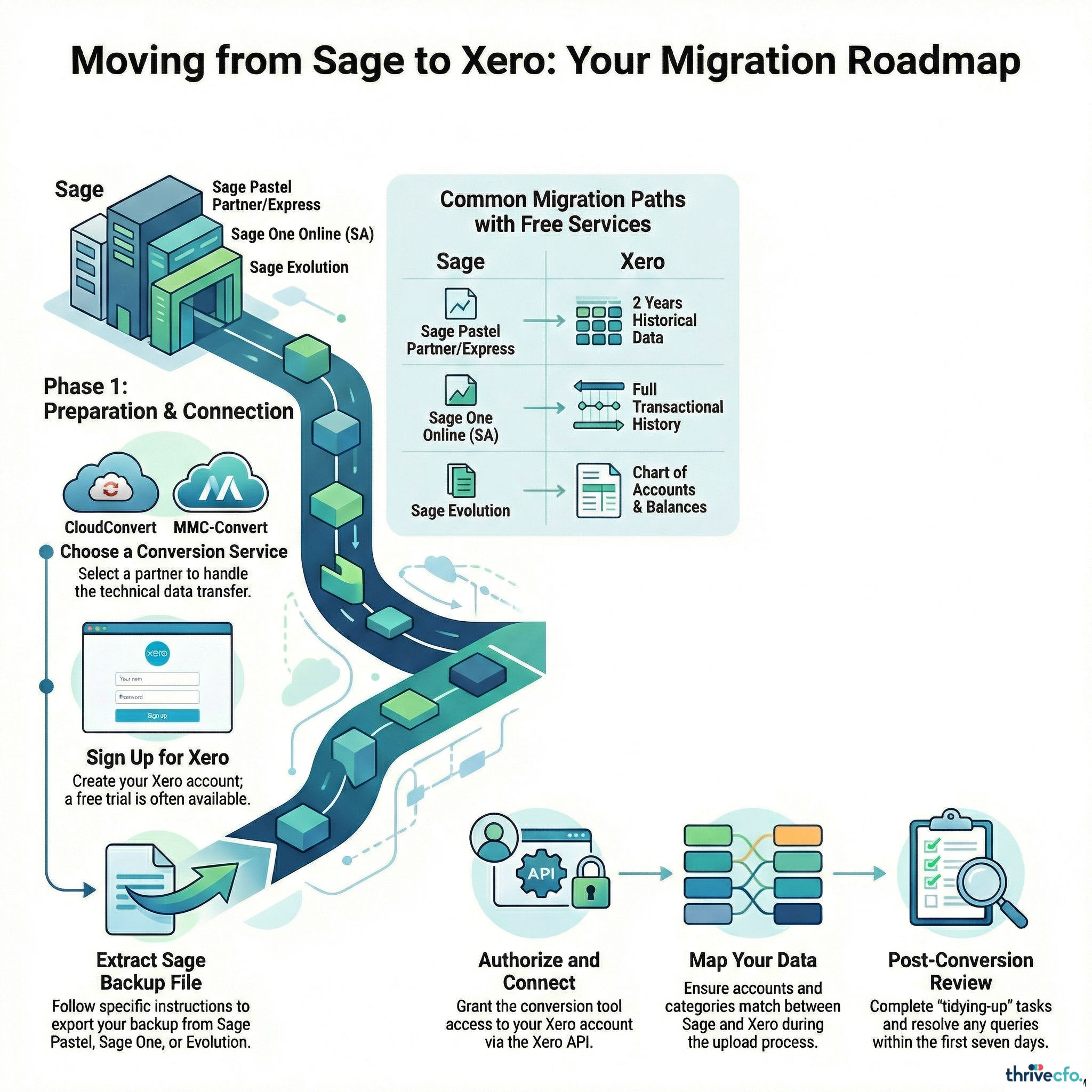
3. Navigating Migration Pathways: Service Providers and Tools
Selecting the right migration partner is a strategic decision that directly impacts data continuity. Using specialised tools reduces the “Time and Costs” risk of implementation and prevents the manual “cleanup” of corrupted data sets.
- CloudConvert (Official South African Partner): As the official Xero conversion service in South Africa, CloudConvert has successfully converted over 3,000 data files. They offer a “Xero Sponsored” free conversion for Sage Pastel Partner & Express, Sage Evolution, and Sage One Online (SA). This typically includes up to 2 years of financial detail or opening balances.
- MMC-Convert: A specialist for complex migrations. MMC-Convert handles transactional history for multiple years, multi-currency requirements, and the preservation of custom charts of accounts via their API-connected in-house tools.
- Movemybooks: A guided online software service that provides clear, step-by-step instructions for moving existing data at a time that suits the practitioner.
The “So What?”: Selecting a specialised provider like CloudConvert for SA-specific products ensures that local nuances—such as South African VAT structures—are handled with precision, protecting the integrity of the historical ledger.
4. The Data Map: Inclusions, Exclusions, and Add-ons
Practitioners must manage the “Loss of Information” risk by acknowledging that a migration rarely produces an exact replica of all historical data. The following table identifies what to expect during a standard conversion.
| Category | Items Included / Excluded |
|---|---|
| Standard Inclusions | Chart of Accounts, Customer/Supplier Details, Opening Balances, Aged Receivables/Payables, Bank Transactions, Invoices, Bills, and Manual Journals. |
| Critical Exclusions | Budgets, Tracked Inventory, Expense Claims, Payment Terms, Invoice Templates, and Deleted/Void Transactions. |
| Paid Add-ons / Complexity | Multicurrency, Payroll History, Employee Setup, and Fixed Asset Registers. |
5. Post-Migration: Security, Compliance, and Quality Control
Strict adherence to post-migration protocols is essential. The buck stops with you: The practitioner remains legally and professionally responsible for ensuring that the generated accounts meet IFRS or IFRS for SMEs standards, regardless of the automation tool used.
- Security Protocols: Implement 2-step authentication as per Xero’s standards to mitigate unauthorised access risks.
- Audit Trail & Data Verification: Conduct a full review of the Xero Audit Trail. Compare the final Xero Trial Balance against the Sage Pastel backup to ensure data integrity during the move.
- Risk Mitigation for Outages: Be aware of “power or equipment outages” during the transition. Data must be fully backed up before the final export from Sage Pastel to prevent catastrophic loss during a failure.
- Regulatory Compliance: Ensure all electronic communications and record-keeping comply with the Electronic Communications and Transactions (ECT) Act of 2002.
- Tidying-Up: Execute manual tasks that do not automate, such as re-linking bank feeds, setting up custom branding, and verifying opening balances.
Conclusion: Realising the Value of the Connected Ecosystem
Migrating from Sage Pastel to Xero is not merely a technical change; it is a fundamental shift toward a paperless, advisory-led environment. By leveraging real-time data, practices can significantly increase profitability and agility, fulfilling the goals highlighted in the IFAC SMP Global Survey regarding the future of the profession.
This transition allows you to provide services at the right time and the right cost, using tools that automate the routine and illuminate the strategic. While the migration requires meticulous planning and a keen awareness of technical risks, the result is a modernised practice prepared for the “long-lived journey” of digital transformation.
While the benefits of Xero are clear, navigating a successful migration requires meticulous planning and execution. If you have specific questions about the process, potential challenges, or how to practically apply these insights to your practice, don’t hesitate to reach out for a deeper conversation.
