

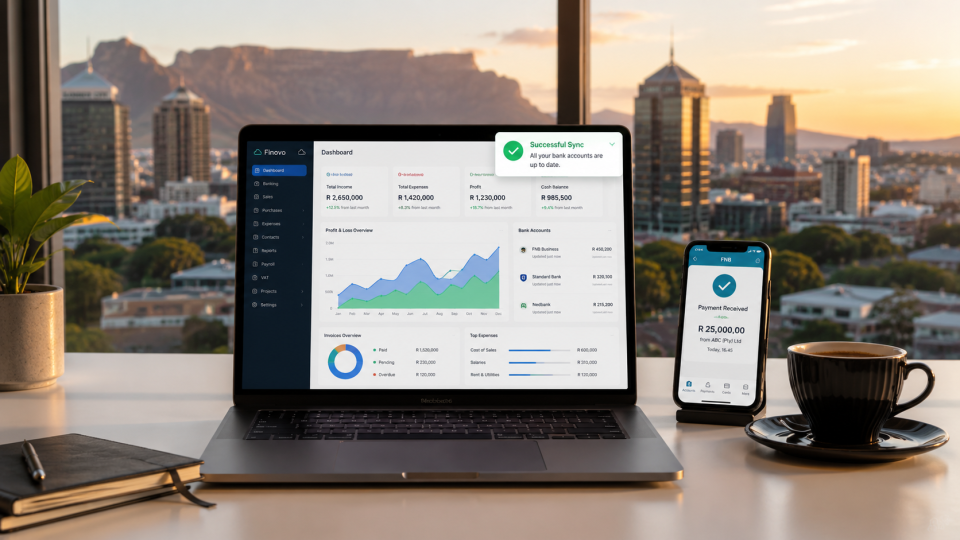
To buy cloud accounting software in South Africa effectively, you need to purchase directly from platforms like Xero or QuickBooks Online to bypass middleman markups and long sales cycles. Select a package that charges in ZAR rather than USD, natively handles South Africa’s 15% VAT for SARS submissions, and offers direct bank feeds with local institutions like FNB, Standard Bank, or Absa.
Most business owners bleed cash without realising it. They pay staff (or spend their own weekends) doing manual data entry, patching together spreadsheets, and hoping the numbers match up at the end of the month. If you are running a business in South Africa today, clinging to desktop software or manual ledgers is a massive liability.
Business owners are increasingly moving away from manual entry and looking for direct purchase options for platforms like Xero or QuickBooks. They want instant access, real-time data, and zero forced interaction with salespeople. But here is the catch: buying the wrong software, or buying the right software the wrong way, will cost you. You end up trapped in USD pricing subscriptions that fluctuate wildly with the Rand, or stuck with a system that completely fails to talk to SARS. This guide breaks down exactly how to buy cloud accounting software in South Africa so you get the data you need to drive profits, without paying a cent more than necessary.
[Image Placement: A frustrated business owner looking at a messy spreadsheet next to a clean, modern dashboard on a laptop. Alt text: Business owner comparing manual spreadsheets to a clear cloud accounting dashboard.]
What Is Cloud Accounting Software?
Stop thinking of accounting software as a digital filing cabinet. Cloud accounting software acts as the financial nervous system of your business. Because it lives online rather than on a hard drive in your office, you access it via a web browser or mobile app.
The primary advantage is speed. These platforms connect directly to your South African bank accounts. When a client pays you, or you swipe your business card, the transaction appears in your software automatically.
⭐ Key Takeaway: The goal of cloud accounting is not just to keep your accountant happy. It is to give you a real-time dashboard of your cash flow so you can make fast, aggressive business decisions.
Key Factors to Consider Before You Buy
Do not just buy the software your buddy uses. Evaluate your purchase based on cold, hard utility in the South African market.
1. South African Compliance (SARS and VAT)
If your software cannot handle South African tax laws natively, it is worthless to you. You need a system that tracks standard VAT (15%) automatically on invoices and expenses. Come tax season, the software should generate reports you can hand straight to your accountant for easy eFiling.
2. Local Bank Integrations
Your software must pull data automatically from your bank. If you bank with FNB, Standard Bank, Absa, Nedbank, or Investec, verify that the software supports direct, automated bank feeds for that specific institution.
3. Pricing: ZAR vs USD
Never buy a subscription priced in US Dollars if a local equivalent exists. The Rand is volatile. A $30/month subscription might cost you R540 today and R600 next month. Buy software that offers fixed pricing in ZAR.
4. Business Complexity
A freelancer needs basic invoicing and expense tracking. A manufacturing SME needs inventory management, multi-currency support, and payroll integrations. Buy the tier that matches your actual operational complexity right now, not where you hope to be in five years. You can always upgrade.
The Best Cloud Accounting Software in South Africa
Here is a breakdown of the dominant players in the local market.
| Platform | Best For | Standout Benefit | The Catch |
|---|---|---|---|
| Xero | Growing SMEs and Agencies | Massive app ecosystem, flawless SA bank feeds. | Higher tiers get expensive quickly. |
| QuickBooks Online | Small Businesses and Retail | Very easy to learn, strong reporting tools. | Some advanced localisation requires add-ons. |
| Sage Accounting | Traditional SA Businesses | Deep roots in South Africa, strong payroll link. | The interface feels slightly dated compared to peers. |
| Zoho Books | Budget-conscious Startups | Highly affordable, part of the wider Zoho suite. | Bank integrations can occasionally be clunky. |
How to Buy Cloud Accounting Software (Step-by-Step)
The market has shifted. You no longer need to sit through a two-hour demo with a regional sales rep to buy accounting software.
Step 1: Define Your Non-Negotiables
Write down exactly what you need. Do you need to run payroll? Do you need to track physical inventory? Do you need multi-currency options because you import goods? Let these requirements dictate your choice.
Step 2: Compare Plans and Features
Software companies use tiered pricing. “Starter” plans usually limit the number of invoices you can send. “Standard” plans remove those limits. “Premium” plans add features like expense claiming and advanced analytics.
💡 Tip: Start one tier lower than you think you need. It is much easier to upgrade your plan with a single click later than to realise you have been overpaying for features you never use.
Step 3: Buy Directly Online
Go straight to the official websites for Xero, QuickBooks Online, or Sage. Buying direct is faster, gives you immediate access to the software, and ensures you own the master admin rights to your data. Avoid third-party software resellers who add margin to your monthly fee.
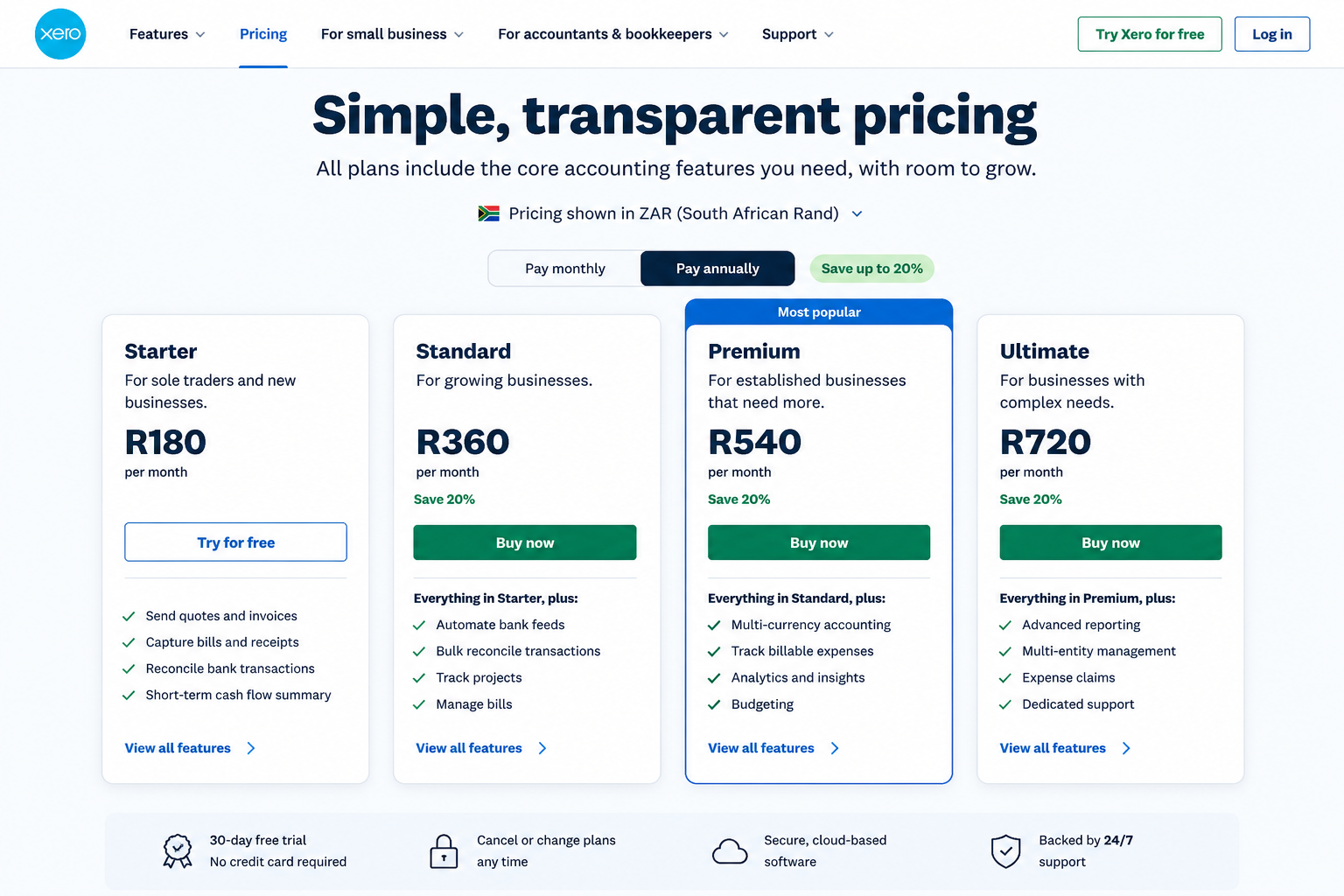
Step 4: Choose Monthly vs Annual Billing
Annual billing often comes with a 10% to 20% discount. If cash flow is tight, or you are not 100% convinced the software is the right fit, stick to monthly billing until you are committed.
Step 5: Connect and Configure
Once purchased, input your business registration details, set your financial year-end, and immediately connect your bank feeds.
Common Mistakes That Cost You Money
- Buying strictly on price: A R150/month program that requires four hours of manual data entry a week is more expensive than a R600/month program that automates the whole process.
- Letting your accountant hold the keys: Always buy the software under your own email address. Give your accountant “Advisor” access. If you have a falling out with your accountant, you do not want them holding your financial data hostage.
- Overbuying features: You don’t need the enterprise tier if you just sell consulting hours.
Cost Breakdown: What You Will Pay
In South Africa, cloud accounting software is a highly competitive market.
- Entry-Level (Freelancers/Solopreneurs): Expect to pay between R150 and R300 per month.
- Mid-Tier (Most SMEs): Expect to pay between R450 and R800 per month. This covers unlimited invoicing and full bank reconciliation.
- Top-Tier (Complex operations): R900 to R1,500+ per month, heavily dependent on add-ons like advanced inventory or integrated payroll.
✅ Key Takeaway: Treat this monthly fee as an operational utility, exactly like your internet bill. It is non-negotiable for running a serious operation.
Should You Buy Direct or Through a Partner?
If you are starting fresh or running a simple operation, buy direct online. It takes five minutes. If you are migrating ten years of messy financial data from an outdated desktop system, hire a certified setup partner or accountant. Pay them a flat, one-off fee to migrate the data, map your chart of accounts correctly, and hand you the keys.
Final Recommendation
Do not overcomplicate this. If you are a freelancer, buy a basic plan from QuickBooks Online or Xero. If you are a growing business that relies on integrating different apps (like connecting your Shopify store to your accounting), Xero is generally the superior choice. Stop managing your business by looking in the rearview mirror of outdated spreadsheets. Pick a platform, buy it directly online today, connect your bank feed, and start managing your business based on actual data.
Frequently Asked Questions (FAQ)
What is the best cloud accounting software in South Africa? Xero and QuickBooks Online are currently the dominant choices due to their strong local bank integrations, ease of use, and robust app ecosystems. Sage remains a popular legacy choice.
Can I buy Xero or QuickBooks directly in South Africa? Yes. You can purchase subscriptions for both platforms directly through their official websites, completely bypassing sales reps or software resellers.
Is cloud accounting software SARS compliant? The major platforms like Xero, QuickBooks Online, and Sage Accounting are designed to handle South African compliance, including automatic 15% VAT tracking and generating reports suitable for SARS submissions.
How much does cloud accounting software cost in South Africa? Prices range from roughly R150 per month for basic, entry-level plans up to R1,000+ per month for premium plans with advanced features like multi-currency support and deep inventory management.
Which software supports South African banks? Xero, Sage, and QuickBooks Online all offer direct, automated bank feeds with major South African banks including FNB, Standard Bank, Absa, Nedbank, and Investec.
